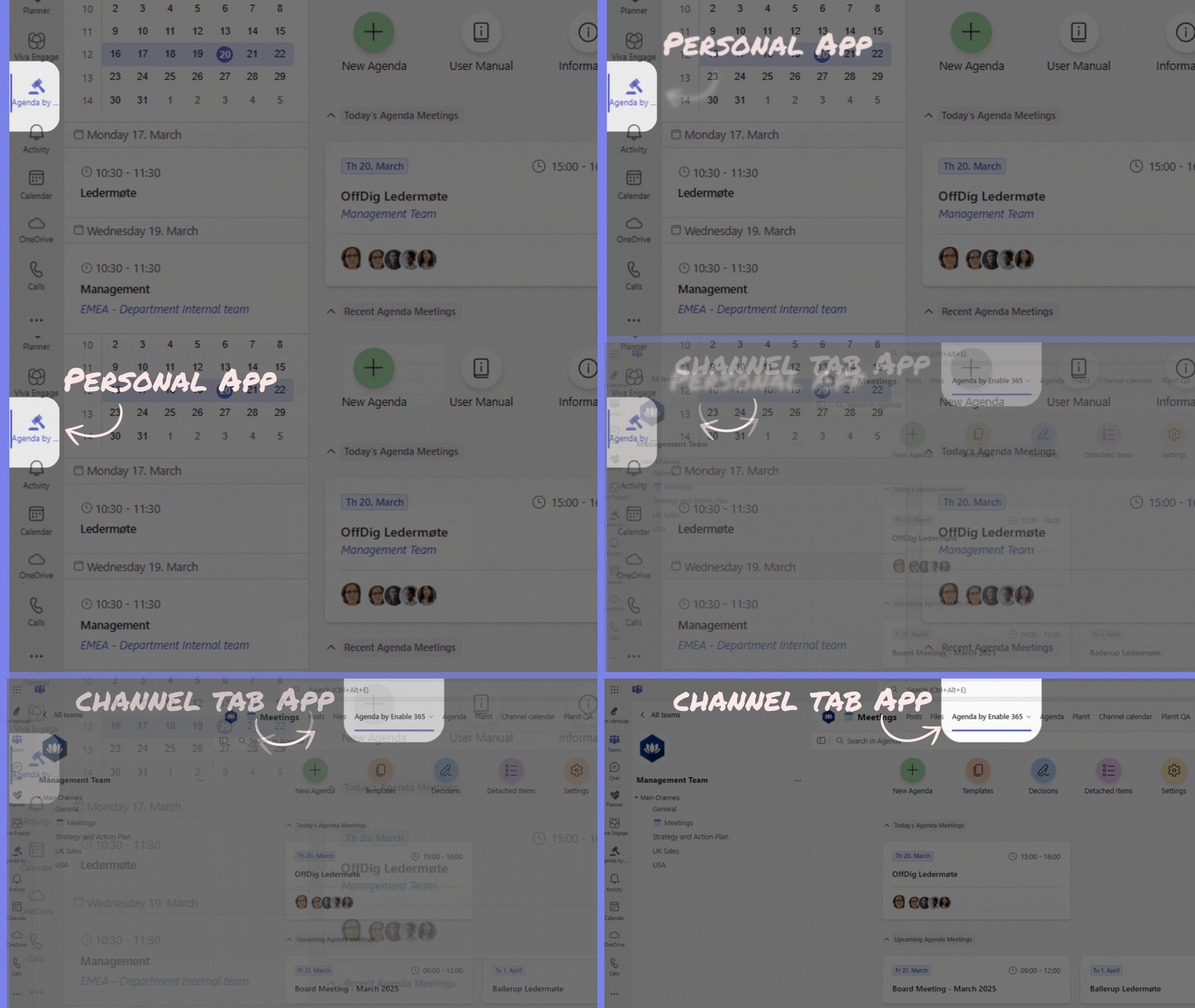
👉 Create Professional Meeting Agenda’s Based on your Calendar Meetings:
With the Agenda app you create professional meeting agendas based on your
Outlook/Teams meetings. This way, Agenda picks up participants, room
location, date and time.
👉Tab app and Personal app:
Agenda is available as both a Tab App within a team channel and a Personal App
in Microsoft Teams. To ensure a well-structured and organized experience,
Agenda is designed to align with the information architecture of Microsoft Teams.
👉 When creating an Agenda meeting based on your Outlook or Teams events,
you determine which Team the meeting belongs to. All related meeting data—
such as the agenda, meeting minutes, agenda items, and supporting
documents—will be securely stored in Agenda within the selected Team.
👉 Settings for Agenda are configured within each team, giving
you the flexibility to customize settings for individual teams. For example, you
can set unique meeting agenda templates, define archiving locations for
minutes and agendas, and adjust other settings to match each Team’s specific
requirements.
👉 The Personal App in Microsoft Teams provides you with a comprehensive
overview of all the meetings you participate in. This makes it easy to stay
organized and track your responsibilities across various teams and events.