
This chapter explains the differences between the choices “Copy to Meeting”, “Forward to meeting”, “Move to backlog” and “Delete”.
The choices are available in the three dot menu (…) for each agenda item.
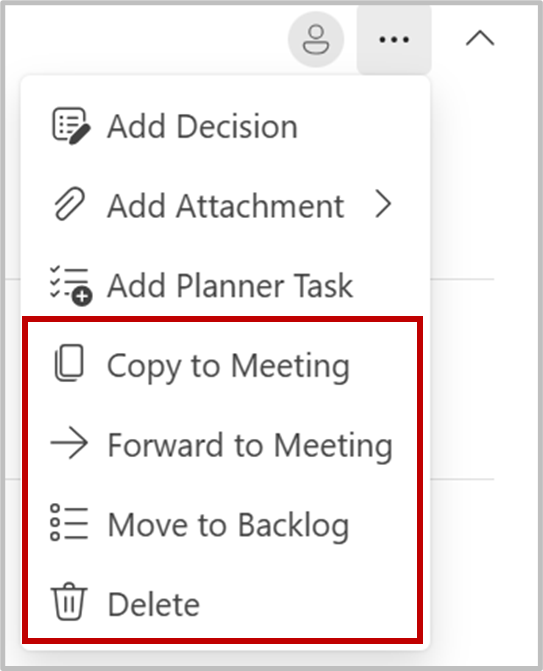
Copy to meeting #
If you want to copy an genda item from one meeting to another, you can easily do this in the agenda. The item, including all its content, will be duplicated and exist as two separate items in the respective meetings. To copy an Agenda item:
- Select «Copy to Meeting» from the menu.
- In the panel on the right, select the meeting where you want to copy the item.
- Confirm by clicking «Select» at the bottom of the panel.
A copy of the agenda item will now appear in the selected meeting, allowing you to work with it independently.
Move to Backlog #
If you want to remove an item from the meeting (not delete it), and are planning to include it in a future meeting you can add it to the Backlog.
Forward to Meeting #
To carry forward an agenda item to a future meeting, follow these steps:
- Select «Forward to Meeting»
- Choose the meeting where you want to carry the item forward.
- The Agenda Item will now be linked to the selected future meeting, allowing you to continue working on it or discuss it further.”
Note: Both forwarding and copying of items require that a future meeting exist.
Delete #
This choice will ask you to confirm, and then delete the agenda item and any uploaded attachments.


